iThemes - Easy Widgets, Icons
- 4.8
- Rating
- 5.00M
- Installs
- Free
- Price
 Analysis by App-foxy
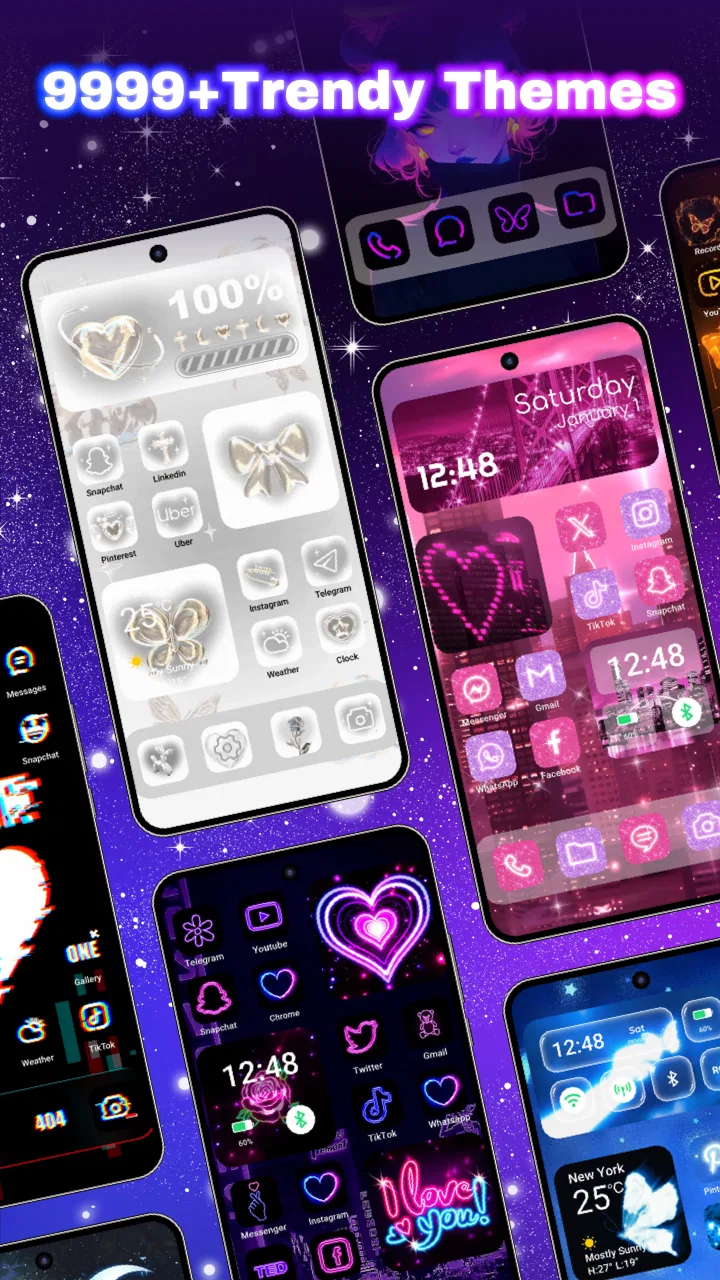
Changing a phone’s appearance usually starts with a wallpaper and ends there. iThemes takes a broader approach by putting wallpapers, icons, widgets, and themed layouts in one personalization app. I found its main appeal in that connected experience: instead of choosing a background first and then hunting through separate tools for matching icons or a useful home-screen element, I could treat the screen as one visual project.
That makes it more interesting than a simple wallpaper gallery, especially if you enjoy refreshing your phone without spending time building every detail manually. The app is free to install, and its age rating is Everyone, so it is approachable for a wide range of users. Optional purchases range from $0.99 to $39.99 per item, which is worth remembering if you become tempted by premium-looking collections while browsing.
Wallpaper World Designs is the developer behind the app. It has been available since October 22, 2021, and the current version is 1.0.0.3419. With over 5 million installs, a 4.8 average from around 74 thousand ratings, and about 4.1 thousand written reviews, it is clearly not a niche experiment. I still think the important question is not popularity, but whether its all-in-one approach suits the way you use your home screen.
You May Also Like

 Blood Strike: 2.5 Anniversary
Blood Strike’s Loadouts Turn Every Drop Into a Tactical Gamble
A close look at Blood Strike’s custom loadouts: how fast access to signature weapons reshapes its battle royale rhythm, rewards preparation, and narrows the gap between fights.

 Pandora - Music & Podcasts
Pandora’s Music Is Easy to Start, but Harder to Recover
Pandora’s strength is its low-effort path from a seed to a station. Its weak spot is how much confidence it asks you to place in connection, setup, and quiet recovery.

 8 Ball Pool
 Is Built on Rivalries, Rematches, and Routine
A close look at the rivalries, rematches, shared routines, and unanswered safety questions that turn a quick pool match into a persistent mobile community.

 Samsung Music
’s Quiet Strength Is Playing What You Already Own
Its reach comes less from spectacle than from dependable access to a personal library. That simplicity is both the app’s strongest retention engine and its ceiling.

 AccuWeather: Weather Radar
AccuWeather Review: A Quick, Clear Forecast for Everyday Decisions
For everyday plans, the best forecast is the one you can understand quickly. AccuWeather makes rain timing, radar, and local conditions easy to act on, with a few trade-offs.

 Hill Climb Racing
Why Hill Climb Racing Still Turns Crashes Into One More Run
A tiny car, a bumpy hill and one more upgrade: Hill Climb Racing keeps resurfacing because its simple chaos makes every near-miss feel personal.
More From Our News Desk



Why the combined theme approach matters
I find the combined theme approach most useful when I want a screen to feel coherent without making every design decision separately. In this section, I’ll look at how that convenience affects browsing and everyday choices, then turn to the moments when network access can shape the experience.
A screen makeover instead of a single background
The strongest capability here is the ability to coordinate several parts of the phone’s visual identity. A wallpaper changes the backdrop, but matching icons and widgets affect what you see every time you unlock the device. In my experience, that difference is what makes a themed setup feel deliberate rather than temporary.
The app presents more than ten thousand themes, icons, widgets, and wallpapers as a large pool of customization material. I would not treat that number as a promise that every item will suit your taste. The useful point is variety: there is room to move between quiet, minimal designs and louder styles without leaving the same app.
This is especially helpful when you have a specific mood in mind. For example, I might want a dark, restrained home screen for work, a colorful arrangement for a personal phone, or a seasonal look that changes the atmosphere without changing the device itself. The combined catalog reduces the need to assemble those pieces from unrelated sources.
The real benefit is consistency, not simply quantity. A wallpaper alone can look good in a preview but become awkward once app icons sit over it. A coordinated theme has a better chance of keeping the background, icon treatment, and widgets visually compatible. That does not guarantee a perfect result on every phone, but it gives me a more sensible starting point than selecting each element at random.
What this changes on an everyday phone
Personalization can sound superficial until you use a phone many times a day. The home screen is the first visual surface I see after unlocking, and small changes can make it feel less stale. iThemes is useful for that low-effort reset: I can change the character of the device without replacing the launcher, reorganizing every app, or learning a complicated design tool.
There is also a practical side to widgets. A good widget can make a screen more useful by placing information or shortcuts where I naturally look. The visual style matters because a widget that clashes with the wallpaper can make the whole layout feel messy. When the pieces are selected as part of one theme, the result is easier to keep tidy.
That said, I would not assume that every theme is equally practical. Some designs are made to attract attention in a preview, while a real home screen needs readable labels, clear icon shapes, and enough contrast. I found the best results came from judging a theme as a daily interface rather than as a decorative image.
Where it sits among personalization alternatives
The usual alternative is to use the phone’s built-in wallpaper picker, a separate icon-pack app, and perhaps a widget tool from another developer. That route can offer more control in each individual area. Someone who already knows exactly which icon pack, launcher, and widget system they want may prefer that modular setup.
iThemes makes more sense for people who value convenience and visual direction. Instead of starting with an empty screen and making every decision independently, I can browse a prepared style and adapt it. The trade-off is that a curated theme may not match my exact preferences, and I may have less freedom than with specialist tools designed around one type of customization.
In other words, this is not automatically the best choice for a power user who enjoys constructing a home screen from tiny details. It is a better fit for someone who wants a convincing transformation without turning personalization into a weekend project. That distinction became clearer to me the longer I used it.
How I would approach the catalog
I recommend browsing with a visual goal rather than opening the app and accepting the first attractive preview. Think about whether you want the screen to feel calm, bright, futuristic, playful, or understated. Then check whether the icons and widgets support that feeling instead of judging only the wallpaper.
A useful workflow is to begin with the background, imagine where your most-used icons will sit, and then look at the theme’s contrast. Busy artwork may look impressive but compete with notification badges and app labels. A simpler background can be the better choice if you rely on the home screen for quick access throughout the day.
I also suggest treating widgets as functional furniture rather than decoration. If a widget takes up valuable space but does not help you reach information faster, it may not deserve a permanent place. The best setup I found was one where the visual elements made the screen feel different while the practical layout stayed familiar.
A realistic daily scenario
Imagine leaving work on a Friday and wanting your phone to feel less formal for the weekend. With separate apps, I might search for a wallpaper, compare icon packs, check whether they work together, and then find a widget with a compatible style. That process is possible, but it creates several points where the design can fall apart.
With iThemes, I would start by browsing a complete look, preview the overall direction, and decide whether it works with the apps I use most. If it does, I can make a broader change in one sitting rather than collecting disconnected pieces. On Monday, I could switch back to a quieter arrangement without rebuilding the entire idea from scratch.
This scenario shows the app’s strongest everyday value: it makes a visual change feel manageable. It is not about needing a new design every day. It is about lowering the effort required when you want your phone to reflect a different mood, event, or personal preference.
Small decisions that improve the result
One non-obvious trade-off is that a theme’s preview is not the same as its performance as a working home screen. I pay attention to the empty areas in the wallpaper because those spaces often determine whether icons remain easy to spot. A beautiful central image can become distracting if it sits directly behind the apps I open most.
Another useful habit is to keep the first change modest. I would begin with one themed screen rather than replacing every familiar shortcut at once. That makes it easier to notice whether the icon style is readable and whether the widget placement still supports my routine. If the setup feels good after ordinary use, then I can extend the look further.
I also think it is wise to separate visual novelty from daily efficiency. A layout may be excellent for showing friends but frustrating when I am trying to open a banking app, message someone, or check information quickly. Keeping essential apps in familiar positions can preserve speed while the theme supplies the cosmetic change.
Where friction can appear
The large catalog is both an advantage and a possible source of decision fatigue. Having many choices sounds ideal, but it can make browsing less focused. I found that setting a short list of requirements—dark or light, quiet or colorful, widget needed or not—helped me avoid endlessly comparing similar designs.
There is also the question of purchases. The app itself is free, which makes trying it straightforward, but optional items can become expensive at the upper end of the listed range. I would browse first and decide on a complete look before buying anything. That approach reduces the chance of paying for separate pieces that do not work well together.
Compatibility is another reason to keep expectations realistic. Android devices can differ in screen proportions, icon behavior, and home-screen arrangements. A design that looks balanced in one preview may need adjustment on another phone. I would not consider that a failure of the idea, but it does mean the app cannot remove every bit of hands-on tweaking.
The minimum operating-system requirement is Android 7.0, so many older devices can use it. Still, owners of particularly dated hardware should prioritize responsiveness over decoration. A themed screen is only worthwhile if the phone remains comfortable to use. I would also check the practical result after applying a style rather than relying entirely on the catalog image.
Who gets the most from it
iThemes is at its best for someone who wants a noticeable home-screen refresh but does not want to learn several customization systems. It is also a good match for users who care about visual coordination and prefer starting from a finished concept. If you regularly change your wallpaper but feel the rest of the screen never quite matches, the combined approach addresses that exact frustration.
It can also suit people who use their phone as a personal expression. Students, creative users, and anyone who enjoys changing the atmosphere of a device may appreciate having themes, icons, widgets, and wallpapers gathered together. The free entry point makes experimentation less intimidating, while the broad selection gives casual users room to explore.
I would be more cautious about recommending it to someone who wants a completely bespoke interface. If you already have a favorite launcher, a carefully tuned icon system, and a widget setup that works perfectly, an all-in-one catalog may add little. A dedicated tool for each part could give you finer control and avoid changing elements you already like.
I would also skip it if your priority is a completely distraction-free phone. Personalization can encourage more browsing and repeated rearranging, especially when there are many attractive options. In that case, a plain built-in wallpaper and a stable layout may serve you better than a catalog designed to invite experimentation.
Value, updates, and the decision to try it
The app’s release history and current version show that it is an established Android personalization product rather than something appearing for the first time. Its 4.8 average and millions of installs suggest that the general concept resonates with a large audience, although those figures should not replace checking whether the available styles suit your own taste.
Because it is free to start, I think the sensible decision is to test the browsing experience and see whether the themes solve a real problem for you. Do not begin with the assumption that more customization is automatically better. Begin with one practical goal: make the home screen easier to read, give an old phone a fresh mood, or create a coordinated look for a particular occasion.
Before committing to a paid item, I would ask three questions. Does the wallpaper leave enough room for readable icons? Do the icons remain recognizable at a glance? Does the widget add useful information or merely fill space? If the answer is no to any of these, a different theme—or a simpler setup—will probably be a better use of time and money.
My final take on the experience
What I like most about iThemes is not the promise of endless decoration; it is the reduction of friction between an idea and a finished-looking phone. The app gives me a way to think in complete visual arrangements instead of isolated wallpapers. That makes it more approachable than building a design from several unrelated alternatives.
Its limitations are tied to the same convenience. Curated choices cannot offer the precision of a fully modular setup, a busy catalog can require patience, and optional purchases deserve careful consideration. Some users will also need to adjust a theme so that everyday shortcuts remain readable and familiar.
My recommendation is straightforward: try it if you want coordinated Android personalization and prefer guided choices over technical control. Start with a single screen, judge the design during normal use, and only then consider expanding the look. If you want to handcraft every icon, widget, and placement, specialist tools will likely suit you better. For everyone else, this is an easy way to make a familiar phone feel noticeably more personal without turning the process into a complicated project.
FAQs for iThemes - Easy Widgets, Icons
01What is iThemes - Easy Widgets, Icons, and what can I use it for?
iThemes - Easy Widgets, Icons is a customization app designed to help you personalize your device’s home screen. It typically combines themed widgets, icon styles, wallpapers, and visual elements in one place, allowing you to create a more coordinated appearance without manually designing every component. It is useful for users who want a quick aesthetic refresh or a complete theme inspired by specific colors, moods, or design styles.
02Is iThemes - Easy Widgets, Icons compatible with my Android or iPhone?
Compatibility can depend on the operating system, device model, and the features supported by the current app version. Before downloading, check the application’s store listing for the required Android or iOS version and supported devices. Some customization options may work differently across platforms, especially home-screen widgets, icon shortcuts, wallpapers, and lock-screen elements. Older devices may also provide fewer customization features.
03Does iThemes - Easy Widgets, Icons cost money to use?
The app may offer free themes or basic customization tools while reserving some widgets, icon packs, wallpapers, or advanced features for premium access. Pricing, subscription terms, and available content can change, so review the official store page before confirming any purchase. If a trial is offered, check its duration and renewal conditions carefully, since subscriptions may renew automatically unless canceled through your device’s account settings.
04How difficult is it to apply widgets, icons, and themes with iThemes?
The app is intended to simplify customization, so most users should be able to browse a collection, select a design, and follow the on-screen instructions to apply it. However, icon installation may require additional steps depending on the operating system, launcher, or shortcut system. You may need to grant permissions, add widgets manually, or repeat the process for individual icons instead of applying everything automatically.
05What permissions and privacy considerations should I know before installing it?
Before installation, review the permissions requested by iThemes - Easy Widgets, Icons and compare them with the app’s main purpose. Customization apps may request access related to notifications, photos, storage, or device features to provide wallpapers and widgets, but unnecessary permissions deserve caution. Read the developer’s privacy policy and the store’s data-safety section to understand whether information may be collected, shared, or used for advertising.
Pros
- Wide selection of widgets
- icons
- and wallpapers for home-screen customization.
- Simple interface makes browsing and applying themes quick for most users.
- Supports creating a more consistent visual style across apps and home screens.
- Regular content updates can provide fresh designs and seasonal options.
- Useful preview tools help you check a theme before applying it.
Cons
- Some premium designs and features may require a subscription or separate purchase.
- Certain themes may not work equally well on every Android launcher or device.
- Customization options can feel limited compared with fully manual launchers.
- Large image packs may use considerable storage and mobile data.
- Ads or promotional content may interrupt browsing in the free version.

iThemes - Easy Widgets, Icons
Gallery